
The 3 phases that every migration project goes through: What are the practical steps you can expect when migrating services to Microsoft 365?
Considering migrating your services to Microsoft 365? Whether you're a small business with a few people or a multinational corporation with thousands of employees, your preparations for the migration and the migration process will be similar. The preparation, testing, and migration phases that we will guide you through successfully will only vary in length and complexity.
Jan Cudrák

From where and to where?
There are many types of migration. Among the most common are:
- Migration of on-premise Exchange and SharePoint solutions to the cloud-based M365 environment (which with with our help they graduated e.g. Military Forests and Estates),
- tenant-to-tenant migration, i.e. migration between M365 tenants,
- migration from other source systems as Google Workspace or various open source email solutions (which we implemented e.g. in Česká spořitelna).
How to migrate clients to Microsoft 365 we proceed in ORBIT?
Phase 1: Preparing for the migration of services to Microsoft 365
Preparation is the most important part migration project (about whereupon we write e.g. here). It takes up to 80 % of time we dedicate to the whole project. U simpler projects we spend about one month on preparation, for really complex projects can take even year and more.
First, we thoroughly analyze the source environment and determine what all is to be migrated, what is to be part of the so-called. scope of migration. Usually, we also cannot do without a suitable migration tool, o whose selection we will discuss below.
Migration but is not just about data is also about users. That's why from the beginning:
- Intensive we communicate with senior managers of each department so that nothing is forgotten,
- forthcoming communication strategy towards end users,to make the change well received,
- we train administrators (especially if it is with encounter the Microsoft 365 ecosystem for the first time) and we are preparing support materials that will take the work of the helpdesk and IT support during the migration weekend.
The result of the preparations is usually a robust migration plan. It contains all migration steps, their timing and the names of the persons responsible.
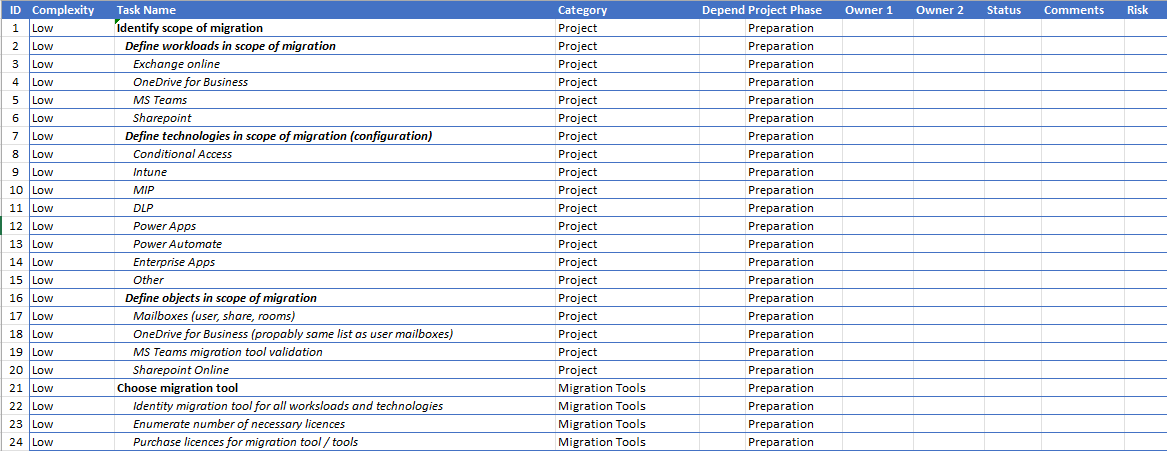
Choosing a migration tool - do I really need to pay extra for a third party product?
Usually, yes. Although Microsoft itself provides tools for email or SharePoint migration, but these solutions cannot be used for all types of migration. Moreover, they do not cover all migratable content, e.g. Teams migration in case of tenant-to-tenant migration.
Fortunately, there are a number of quality third-party tools on the market that will make your life much easier once you purchase a license. They will allow you to migrate everything you need and usually provide you with support during the migration.
Personally, when migrating services to Microsoft 365, I have tried, for example MigrationWiz from BitTitan, Cloudiway or Quest on Demand Migration. Each tool has its own specifics, advantages and disadvantages, so it is necessary to spend enough time choosing the right one.
Phase 2: Testing or have we forgotten anything?
Thorough preparations are followed by proper testing all planned steps migration. We migrate content that has no real owner (it is prepared artificially). In case of failure, we are therefore not at risk of major problems.
The test results will reveal shortcomings of the migration plan, that we can fix. We also get hands-on with how the migration tool works and are able to improve communication with users.
Phase 3: Migration - from pilot to whole
After a successful test, we can proceed to pilot migration, that already involves real data and people. For example, we will select an entire corporate department and move it completely to the new M365 solution. This way, we can verify on a small scale that everything is working properly.
We will follow up the successful pilot migration by migrating the rest of the users and data. This usually happens over a weekend to give the IT department enough time to resolve any issues. Often DNS records (MX, SPF, DKIM, DMARC) are also affected - depending on the type of migration.
After the migration weekend, all users are migrated and all traffic is switched to the new Microsoft 365 solution.
Final recapitulation
How will you contribute to the success of the entire migration of services to Microsoft 365?
- Don't underestimate the preparatory work
As I mentioned in the introduction, spend most of your time, at least months, preparing.
- Choose the right migration tool
Explore the tools available to you (whether from the Microsoft family or third parties). Try them out in a trial version and choose the one that meets all your needs.
- Communicate with each other and train users
Users are the most important part of the migration. Therefore, emphasize good communication and sufficient training on how to use the tools and options in M365.
- Thoroughly test and pilot
Conducting a test and pilot will help identify potential problems. This will save you valuable time in dealing with them during a busy migration weekend.
Migrating services to Microsoft 365 can be a very complex matter. If you're just getting started with M365, it may not be simple for internal IT staff. To avoid risking financial or reputational damage, it's wise to enlist the help of someone who hasexperience with migrations to Microsoft 365. Our experts are backed by certifications, continuing education and hundreds of projects across Europe.